
Version Number: v1.0.1
Published Date: 29 Sep 2026
____________________________________________________________________________
Where to find Investigations
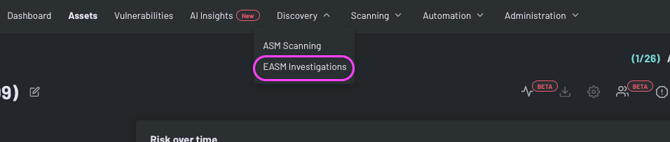
Located at the top of the page is the "Discovery" section, you can initiate an Investigation
Building out your Investigation
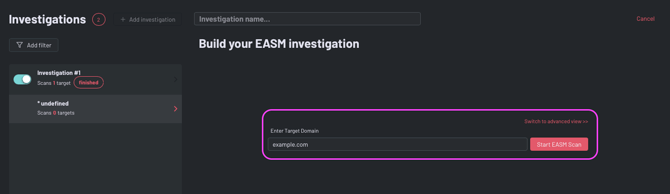
There are 2 distinct methods for setting up your investigation, the Simple Setup and the Advanced Setup.
The Simple Setup
Add in a target domain and click Start Investigation.
The Advanced Setup
Involves more intricate configurations but provides a wider coverage across different task types, catering to users in need of a more thorough analysis.
Add your target domain, you can add multiple.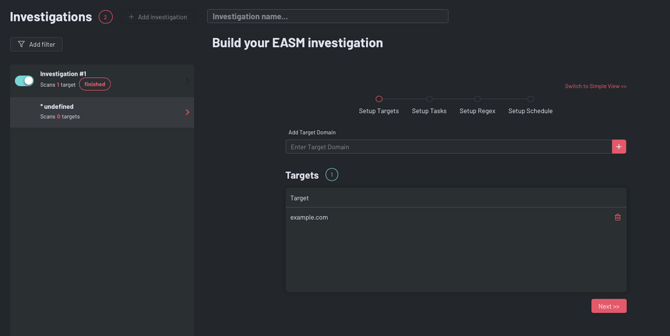
Click next and decide the Tasks you want to run as part of the investigation. The required tasks must be included in any investigation.
You can read a detailed breakdown of each task here.
Setting regexes
Regex, short for 'Regular Expression', is a tool for matching patterns in text. It acts as a powerful filter for specific string patterns.
Edgescan uses the Ruby style of Regex, known for its specific syntax rules. Tools like Rubular, a Ruby regular expression editor, are recommended for testing and ensuring correct syntax.
Example: For the regex 'edgescan', matches include 'http://edgescan.com ' and '123edgescan.com', but not 'edge123scan.com' or 'edge.scan.com'.
Setup Schedule
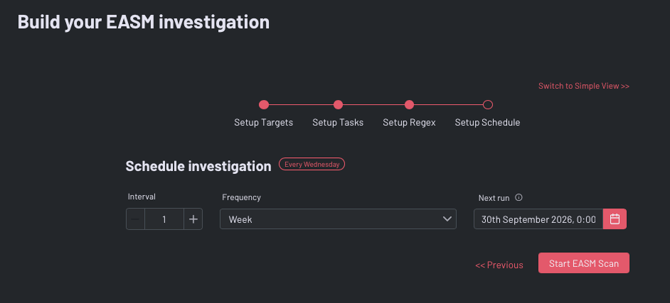
You can easily schedule scans to fit any timeframe. Scheduling options are flexible, including daily, weekly, monthly intervals, and more, allowing for customized investigations that meet any requirement.
For example, a weekly scan is set below, to begin on Sept 30th.
Investigation Stream
The interface of the EASM tool, known as the 'Investigation Stream,' is showcased in the screenshot below. This allows users to monitor a stream of results that includes new domains, records, services, and registrants. On the left side, a summary presents key statistics such as 21 domains, 70 records, 3 services, and 0 certificates that have been identified. 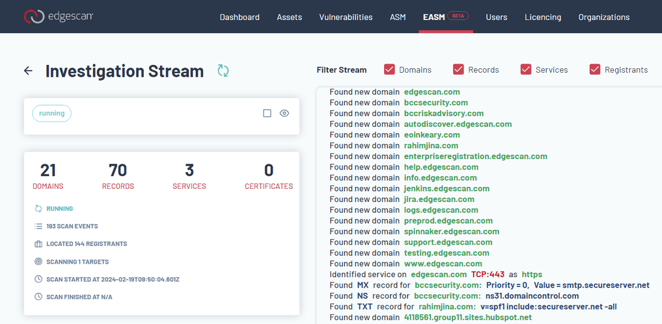
The interface is interactive, offering options to filter the stream by domains, records, services, and registrants. An ongoing scan is indicated in the example, with 193 scan events recorded and 144 registrants discovered. The right side of the interface displays newly found domains and records, showcasing the progress of the active investigation.