Version Number: v1.0.2
Published Date: 09 Oct 2026
____________________________________________________________________________
The SLA Settings section is available for Org Admins and allows for the management of SLAs.
The SLA manager enables Org Admins to set SLA targets based on either risk score or CVSS score.
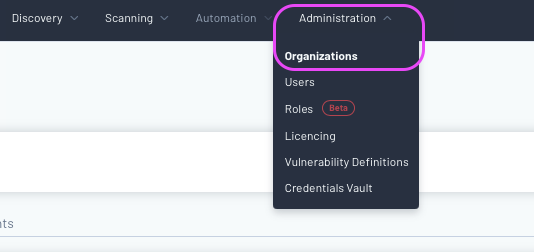
You can access the SLAs via Administration -> Organization
For each organization you have an Org Admin role on, you can have separately defined SLAs.

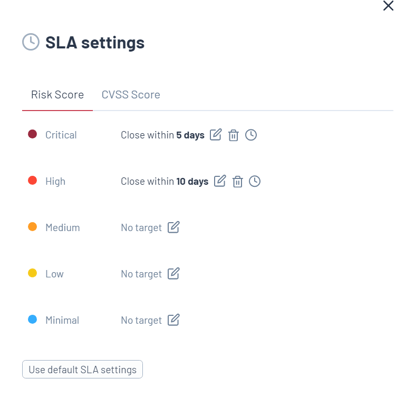
For Risk Score SLA, targets can be defined across the 5 Risk Score categories (critical, high, medium, low, minimal).
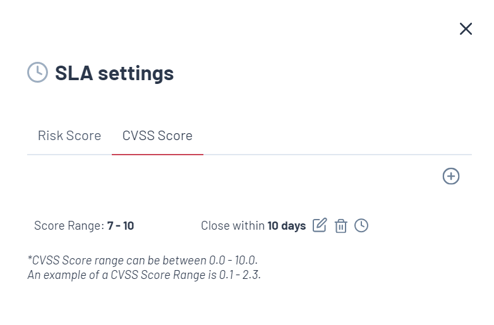
With CVSS Score SLA, a score range between 0.0 and 10.0 can be set. In this example we set a SLA for CVSS scores between 7 and 10 and asked that within 10 days it be closed.
Next to each SLA, there are options for editing, deleting, and viewing violations. Clicking on "view violations" will take you to the vulnerability index page where you can see all vulnerabilities that breach the selected SLA. Users also have the ability to filter vulnerabilities based on SLA violations.

When a vulnerability surpasses its SLA, it will be showcased in the details section of the Vulnerability. Users also have the capability to customize reports to display SLAs that have been violated. Additionally, users can opt to receive notifications for breached SLAs by subscribing to SLA events. For further details on these events, please refer to our event information.
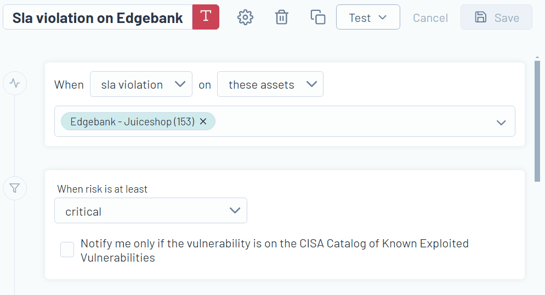
SLA Violation Event:
Automated alerts can now be set up for breached SLAs using the event manager.