
Version Number: v1.0.0
Published Date: 11 Nov 2025
____________________________________________________________________________
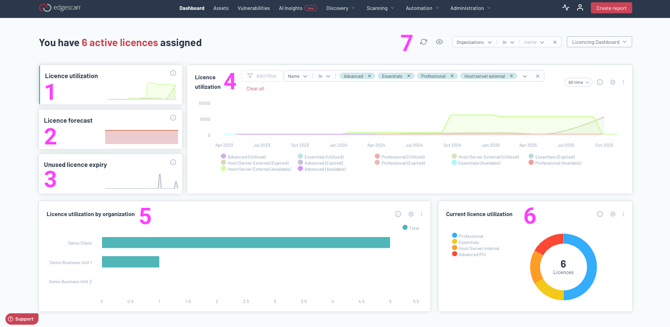
There are 5 key sections in the dashboard, and if you manage more than one organization you have the option to filter to get more focused dashboards.
-
Licence utilization
This chart tracks licence utilization over time, showing trends in how your licences have been used each month. The area spline graph includes three key data points:
- Utilized Licences - Active licences currently assigned to assets.
- Available Licences - Active licences that still have capacity to be assigned to more assets.
- Expired Licences - Licences that have passed their end date and are no longer usable.
By analyzing this chart, you can identify usage patterns, and ensure you are making the most of your available licences.
-
Licence forecast
This chart projects the number of licences needed over the next 12 months based on the number of licences purchased in each month last year, with an adjustable percentage increase to forecast future demand. By reviewing this forecast, you can anticipate licence needs, plan purchases accordingly, and ensure sufficient coverage to support your assets.
-
Unused licence expiry
This chart shows the number of licences that expired unused each month. A licence is considered expired unused if it was never assigned to an asset before reaching its expiration date. By tracking expired unused licences, you can identify potential inefficiencies in licence allocation, optimize future purchases, and reduce wasted licences.
-
Main dashboard field
If you click on any of the other dashboards images, they will be moved from the small display to the large display.
-
Licence utilization by organization
This bar chart displays the number of licences currently in use by assets within each organization in your organization hierarchy. This visualization helps you compare licence usage between organizations, identify trends, and ensure efficient distribution of licences within your hierarchy.
-
Current licence utilization
This chart displays the number of each type of licence that is currently in use by your assets. A licence is considered "in use" if it has been assigned to an asset and is currently active—meaning its start date has passed, but its end date has not yet been reached. This visualization helps you understand how your licences are being utilized across your assets in real time.
-
Filter Options
You can filter your dashboards based on the organization you wish to view the dashboard for.